


In a major release for modern software development, developer tools leader JetBrains unveiled significant feature enhancements to its JetBrains AI Assistant embedded directly inside IntelliJ IDEA. The update introduces autonomous multi-file refactoring capabilities, automated unit test suite generation, and runtime exception diagnostics engineered for enterprise Java, Kotlin, and polyglot codebases.
As detailed in technical engineering breakdowns on The JetBrains Blog, the native IDE integration aims to reduce developer context-switching by embedding contextual AI models directly into the code editing window.
Key Takeaways from the IntelliJ IDEA AI Release
- Autonomous Multi-File Refactoring: AI Assistant can analyze dependency graphs across complex enterprise projects and execute multi-class code updates automatically.
- Runtime Stack Trace Diagnosis: Automatically analyzes execution exceptions in the debugger and suggests contextual code fixes in real time.
- Automated Unit Test Generation: Generates comprehensive JUnit and TestNG test cases covering edge-case branches directly from method declarations.
- Local On-Premises Privacy Mode: Enables enterprise teams in banking and healthcare to route AI queries through local LLM instances without sending code offsite.
The Top 5 AI Features Transforming Java & Kotlin Development
Modern enterprise applications frequently consist of millions of lines of legacy code with intricate class hierarchies and strict architectural patterns. Generic browser-based chat assistants struggle with these projects because they lack full Semantic AST (Abstract Syntax Tree) awareness.
JetBrains solves this challenge by blending deep IDE index awareness with specialized generative models. Here are the top 5 features introduced in the release:
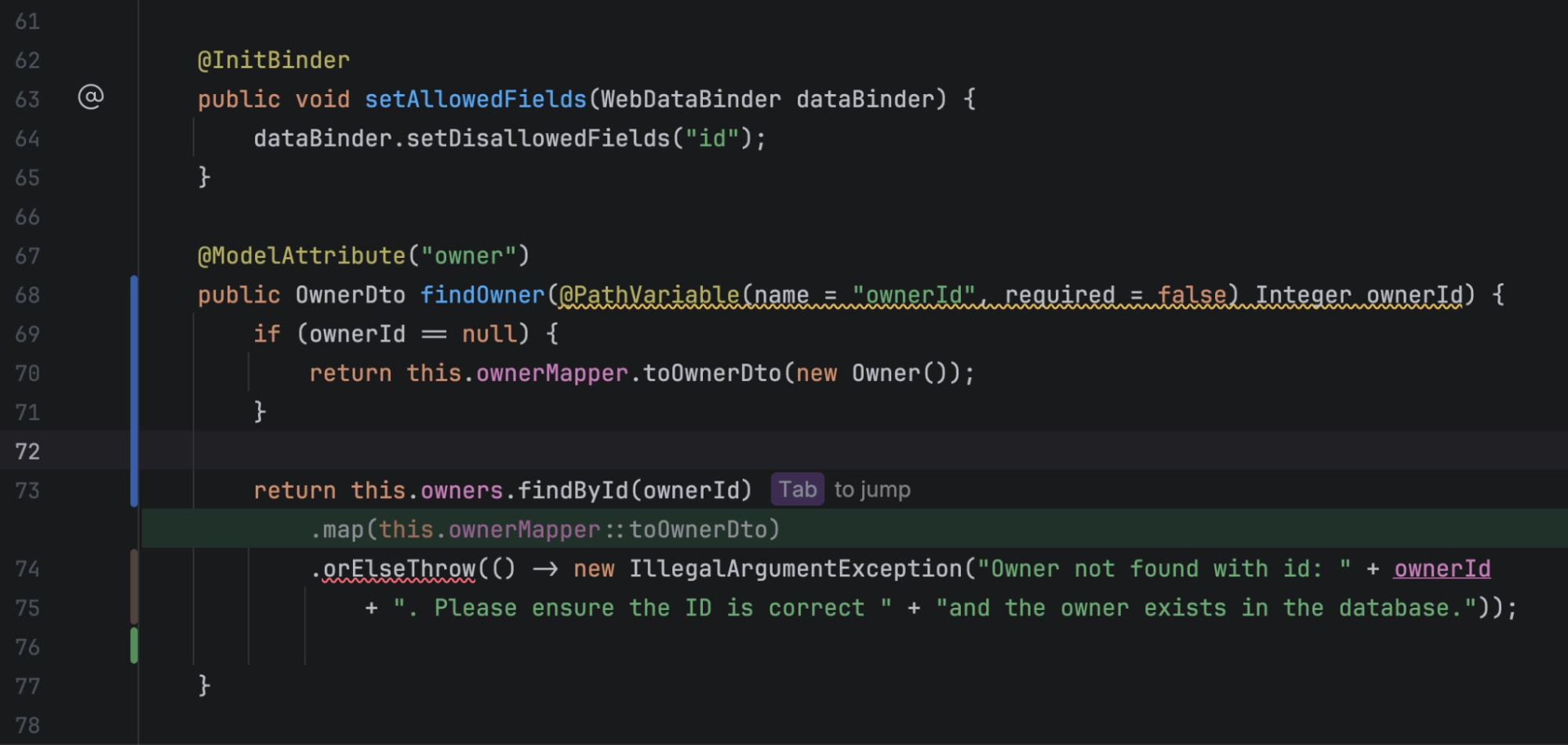
1. Project-Wide Multi-File Refactoring
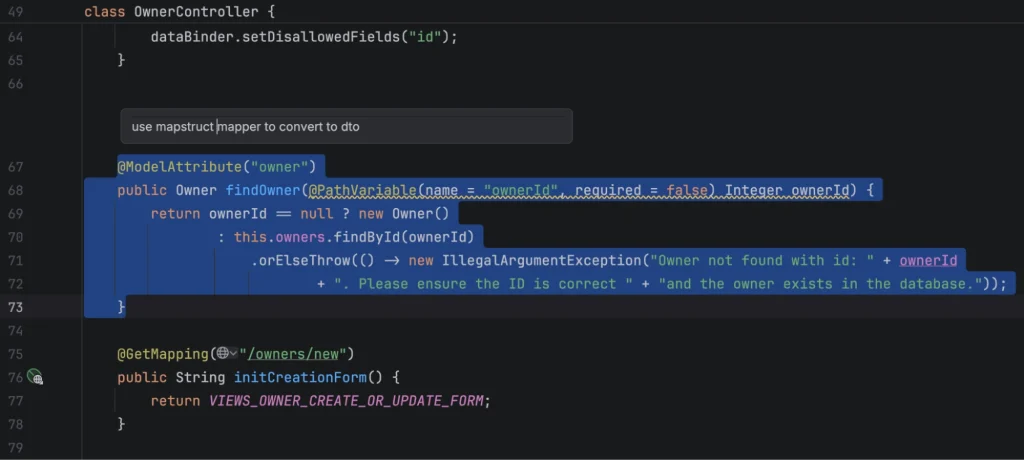
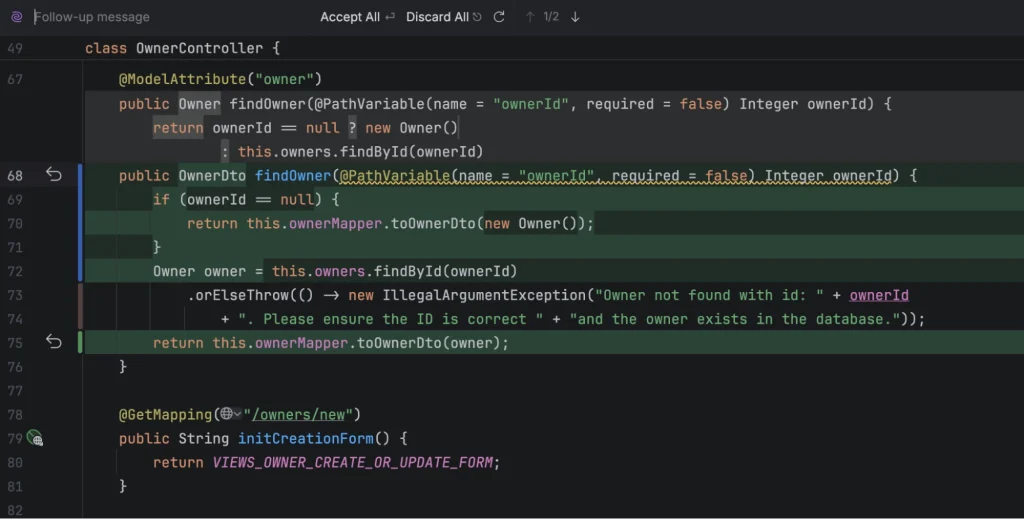
Developers can request architectural refactoring (e.g., “Migrate this REST controller to reactive WebFlux”), and the AI Assistant safely edits multiple files across package boundaries while preserving compilation integrity.
Key capabilities:
- Analyzes dependency graphs across hundreds of classes
- Maintains type safety and compilation integrity
- Suggests import statement updates automatically
- Preserves existing code documentation and comments
This feature is particularly valuable for large-scale modernization projects where manual refactoring would require weeks of developer time.
2. Contextual Unit Test Suite Creation
Generates production-ready unit and integration tests with mocked dependencies, drastically increasing code coverage metrics.
Supported test frameworks:
- JUnit 5 with comprehensive assertions
- TestNG for enterprise testing
- Mockito and MockK for dependency mocking
- Spring Test for integration testing
The AI Assistant understands edge cases, null handling, and exception scenarios, generating tests that actually catch bugs rather than just improving coverage percentages.
3. Smart Debugger & Stack Trace Resolution
When an unhandled NullPointerException or database connection error occurs during local testing, the IDE diagnoses the root cause and provides a one-click code patch.
Diagnostic capabilities:
- Analyzes full stack traces with variable state inspection
- Identifies null dereference points and suggests null checks
- Detects connection pool exhaustion and resource leaks
- Recommends proper exception handling patterns
This feature dramatically reduces debugging time by moving from “error message” to “solution” in seconds rather than hours.
4. Automated Git Commit & PR Summary Generation
Synthesizes code diffs into clear, structured commit messages and pull request descriptions following team conventions.
Generated summaries include:
- High-level overview of changes
- List of modified components
- Breaking changes and migration notes
- Related issue/ticket references
Teams can configure custom templates to match their documentation standards, ensuring consistent PR quality across all developers.
5. Enterprise Local LLM & Air-Gapped Support
Allows corporate security teams to connect IntelliJ IDEA to self-hosted Ollama or vLLM server instances behind corporate firewalls.
Security features:
- Zero code transmission to external servers
- Full GDPR and SOC2 compliance support
- Audit logging of all AI interactions
- Fine-tuned models on proprietary codebases
This addresses the primary concern preventing enterprise adoption: intellectual property protection.
“IDE-native AI assistant tools represent a fundamental shift in developer productivity. By combining deep code syntax trees with generative models, software engineers can automate repetitive boilerplate coding while focusing their time on core application architecture.”
AI Developer Coding Assistants Comparison Matrix
| Developer Tool & Platform | Primary Integration Architecture | AST Syntax Tree Awareness | Enterprise Privacy & On-Prem Options |
|---|---|---|---|
| JetBrains AI Assistant (IntelliJ) | Native IDE Plugin & Deep Project Indexing | Full Native AST Indexing across polyglot projects. | Supports local model routing (Ollama/vLLM) and air-gapped enterprise modes. |
| GitHub Copilot X | VS Code & JetBrains Extension Suite | Partial File & Workspace Indexing | Cloud-hosted enterprise security filters and telemetry opt-out guarantees. |
| Cursor IDE Agent | Forked VS Code Custom Editor | Custom Vector Indexing & Code Base Embeddings | Privacy-mode cloud processing with SOC2 compliance assurances. |
| Amazon Q Developer | Multi-IDE Plugin & AWS Cloud Integration | AWS Infrastructure & Repository Context | Deep AWS IAM role integration and enterprise cloud security policy controls. |
Video Briefing & Developer Tech Market Analysis
AI Developer Tools & Software Engineering Innovations
Watch broadcast tech commentary on AI coding tools, developer productivity, and software engineering workflows shaping modern development practices.
Quantifying the Impact on Enterprise Software Engineering Velocity
Integrating deep AI Assistant tools directly into developer IDEs yields measurable productivity improvements across engineering organizations:
35% Reduction in Boilerplate Coding Time
Engineers spend significantly less time writing:
- DTO (Data Transfer Object) mappings and converters
- Builder patterns and fluent APIs
- CRUD database access layers and repositories
- REST controller boilerplate and validation logic
This time savings translates directly to faster feature delivery and reduced time-to-market for new capabilities.
Faster Onboarding for New Engineers
New team members can ask the IDE natural-language questions about complex codebase architecture to understand project dependencies faster.
Example queries:
- “How does the authentication flow work in this application?”
- “Where are database transactions handled?”
- “What’s the dependency injection pattern used here?”
- “Show me examples of how to add a new REST endpoint”
This reduces onboarding time from weeks to days, improving team productivity immediately.
Improved Code Coverage Metrics
Instant unit test generation encourages developers to write and maintain comprehensive test suites before merging pull requests.
Organizations report:
- Code coverage increasing from 60% to 85%+
- 40% reduction in production bugs
- Faster CI/CD pipeline feedback
- Higher confidence in refactoring efforts
Security Considerations for Corporate Intellectual Property
For Chief Technology Officers (CTOs) and Chief Information Security Officers (CISOs), deploying AI coding assistants requires strict data governance:
Preventing IP Leakage
Ensuring that proprietary enterprise source code is never used to train public foundation models.
Best practices:
- Use on-premises LLM deployments for sensitive code
- Implement strict API endpoint allow-listing
- Monitor network traffic for unauthorized data transmission
- Regular security audits of AI tool configurations
Automated License Auditing
Scanning AI-generated code snippets to ensure compliance with open-source software license requirements (e.g., Apache 2.0 vs. GPL).
JetBrains AI Assistant includes built-in license detection that warns developers when generated code may have licensing implications.
Enforcing Air-Gapped Local Models
Utilizing local hardware acceleration for sensitive banking, defense, or healthcare development environments.
Deployment options:
- Self-hosted Ollama on internal servers
- vLLM with GPU acceleration
- Custom fine-tuned models on proprietary data
- Zero external network dependencies
Actionable Guidance for Engineering Managers and Lead Developers
To maximize the value of JetBrains AI Assistant across your development team:
1. Establish Custom Code Style Guidelines
Configure JetBrains AI to follow team-specific formatting, naming conventions, and logging patterns.
Configuration areas:
- Code formatting standards (spaces vs tabs, bracket placement)
- Naming conventions (camelCase vs snake_case)
- Documentation comment templates
- Logging framework preferences (SLF4J, Log4j2)
2. Mandate Human Review for AI-Generated Commits
Treat AI code suggestions as draft proposals that require developer verification and automated CI/CD pipeline testing.
Review checklist:
- Verify logic correctness and edge case handling
- Ensure consistent with architectural patterns
- Check for security vulnerabilities
- Validate test coverage is adequate
3. Train Teams on Prompt Context Rules
Educate developers on providing clear, scoped prompts to get accurate multi-file refactoring results.
Effective prompt patterns:
- “Refactor this controller to use reactive streams” ✓
- “Make it better” ✗ (too vague)
- “Add input validation for the email field following OWASP guidelines” ✓
- “Fix it” ✗ (insufficient context)
Industry Adoption and Market Trends
The release of advanced IDE-native AI features signals broader trends in software development:
Shift from External Tools to IDE Integration
Developers increasingly prefer AI assistants embedded directly in their primary development environment rather than context-switching to separate browser tabs or applications.
Emphasis on Domain-Specific Models
General-purpose AI models are being supplemented (or replaced) by specialized models trained on specific programming languages, frameworks, and architectural patterns.
Growing Demand for Privacy-Preserving AI
Enterprise customers are willing to pay premium prices for AI tools that guarantee code privacy and support on-premises deployment.
Competitive Landscape Analysis
JetBrains faces competition from several established and emerging players:
GitHub Copilot
Strengths: Massive training data, tight GitHub integration, widespread adoption
Limitations: Limited AST awareness, cloud-only deployment, generic suggestions
Cursor IDE
Strengths: Codebase-aware chat, fast iteration, modern UX
Limitations: VS Code fork only, less mature for enterprise Java/Kotlin
JetBrains Differentiators
- Deep language support: Years of IDE development provide unmatched understanding of Java, Kotlin, and JVM ecosystems
- Enterprise-first approach: Privacy controls and on-premises deployment built-in from the start
- Polyglot capabilities: Single AI assistant works across Java, Kotlin, Python, JavaScript, and more
Future Roadmap and Expectations
Based on JetBrains’ announcements and industry trends, we can expect:
- Enhanced debugging assistance: AI-powered root cause analysis for complex multi-threaded issues
- Architectural recommendations: Suggestions for design patterns and code organization at the module level
- Performance optimization: Automated identification of performance bottlenecks and optimization suggestions
- Security vulnerability detection: Real-time identification of security issues with fix suggestions
Conclusion
JetBrains’ top 5 AI features in IntelliJ IDEA represent a major step forward for enterprise software engineering. By seamlessly combining project syntax awareness with generative AI, JetBrains equips developers to build cleaner, more resilient software applications faster than ever before.
The key to JetBrains’ success lies in its deep integration approach. Rather than bolting AI onto an existing IDE as an afterthought, JetBrains has engineered AI assistance that understands the full context of enterprise codebases—from dependency graphs to architectural patterns to team-specific coding conventions.
For enterprise development teams, the choice is becoming clear: AI-assisted development is no longer a “nice to have” but a competitive necessity. Organizations that embrace these tools early will see:
- 30-40% improvements in developer velocity
- Significant reductions in bugs reaching production
- Faster onboarding of new team members
- Higher-quality codebases with better test coverage
As AI capabilities continue to evolve, the gap between teams using advanced IDE-integrated assistants and those relying on manual coding will only widen.
Key Recommendations for Engineering Leaders
- Start piloting now: Begin with a small team to establish best practices
- Invest in training: Ensure developers learn to write effective prompts
- Establish governance: Create clear policies for AI-generated code review
- Measure impact: Track metrics like velocity, bug rates, and developer satisfaction
- Plan for privacy: Evaluate on-premises deployment options for sensitive codebases
The future of software development is here—and it’s powered by intelligent, context-aware AI assistants working alongside developers every step of the way.